Tuesday, June 12, 2012

Trimble SketchUp? Good Enough…

When the sale of Google SketchUp to Trimble Navigation was announced, it reminded me of the days when the original SketchUp development team was still around. They held an informal conference a few blocks from their offices in the Fall of 2005. It was a small gathering at a little hotel with break out sessions, a few larger presentations, and fabulous display of food and drinks. Not sure, but maybe 500 people tops attended, some invited, most came because they were chosen in a lottery.

At the time, not many realized this simple 3D modeling program was about to be swallowed up by some really big ideas.

SketchUp and @Last Software
@Last Software had a startup spirit then that was infectious and somehow oddly personal. The enthusiasm of their employees started at the top with founders Brad Schell and Joe Esch and made it all the way down to almost everyone in the organization. And thanks to Mark Carvalho and a core group of evangelists, their marketing approach was so personal that everyone wanted to meet the people who put this amazingly intuitive program together. All dedicated geniuses, that was pretty clear.
SketchUp Base Camp 2005 - Insitebuilders
It was also pretty clear that @Last was looking for an out. Autodesk and Google were sort of circling around, Trimble might have even been there. And there were open and honest conversations about the future direction for SketchUp including an all hands meeting where the development team introduced an early version of Layout -- a page composer that coupled 3D to 2D using an AutoCAD paperspace like environment. A photo texturing editor was also hinted at, as well as a passing mention of a geo-locating feature that linked SketchUp to Google Earth.
AutoCAD Paperspace - Insitebuilders.com
What was interesting was that these in-house presentations were more about testing reaction to ideas than it was about announcing new features. That worked because it triggered a lot of the discussion about balancing the wish-list for more “cool” design features with the original idea of keeping SketchUp a simple, user friendly 3D modeler. More than one attendee cautioned the team not to make things too complicated with new features. Keeping the program simple was something most understood as the strength of the program.

Of course, you can’t keep something simple and survive, let alone succeed – financially that is – without a lot of new features. You need a market, growth, and more paying users, and you couldn’t get that without a lot of hype and grandstanding.

Google and SketchUp
The startup energy was long gone when we revisited the SketchUp offices in Boulder after the Google acquisition. In its place were security procedures, unsmiling workers, openly political posturing, and a tension and focus that reminded us of an old fashioned sweatshop. Not that it was. It was just that the joy seemed to have faded into a kind of forced happiness that came with all you can eat goodies, offered like candy to children.

Probably no different than any other Google office on a normal day, but the contrast was striking when one thought back to the energy and enthusiasm of the original @Last team. We never went back. Google had literally moved Google Earth in on @Last, bringing with them a new and more global focus, big ideas and a lot of money.
Google Earth Cyber City - Insitebuilders.com
Though some at the 2005 conference believed SketchUp’s new geo-locating feature and Google Earth had rather limited applications, as it turned out it was that feature, along with patents on the simple and user friendly Push/Pull modeling engine, that sold Google on the acquisition. Their goal of course was to populate Google Earth with photoreal 3D models. We all know now that “Street Views” does a far better job of capturing real photo-reality. And it is Trimble Navigation that makes Street Views possible.

Now it’s Trimble’s turn
It’s interesting to read the latest threads on the SketchUp forums about the Trimble acquisition. Still the dreamy wish lists for all kinds of “cool” new features that Trimble should incorporate. Not that that’s bad, but it explains the kind of specialized focus that looks more to light rays, textures, and design tools that fuel both the forums and a much more interesting after market of Plugins and third-party programs.
CatchUp Newsletter - Insitebuilders.com
Of course, no one knows what Trimble’s plans really are, but it’s a pretty safe bet that they see the real value of SketchUp in the very same, simple, intuitive Push/Pull modeling engine that Google purchased from @Last -- and probably still maintains a financial interest.

Unlike many designers, almost every constructor knows what any one of Trimble Navigation’s four core market segments has already done to revolutionize field surveying, layout, agriculture, exploration, and geo-mapping. Their GPS technology has literally changed the way field work is done for almost everything that includes a survey, plot, plan, map, farm, drone, scanners, or satellite. This of course includes what Trimble Navigation did for “Street Views” and Google Earth. Trimble Navigation - Insitebuilders.com
http://www.geosystems.co.nz/drupal/taxonomy/term/16
http://www.korecgroup.com/


Add to these innovative technologies, the recent acquisition by Trimble Navigation of a handful of point scanning and BIM and CAD software and management companies and you get an idea why SketchUp is such a good fit for where they are going. A “cool” design tool may be on the table, but there’s much more opportunity in blending two and three-dimensional visualization with GPS, geo-data, mapping, engineering, production, and civil and building construction.
Real Works Tunnel - Insitebuilders.com
These are the core markets for Trimble Navigation and there is little doubt that all of these systems are about to see the same simple 3D modeling engine that @Last invented and patented years ago incorporated into their software. It’s like going back into the future, all over again.

Back to Simple “3D for everybody”
The point here is that it’s the underlying simplicity programmed by Esch and Schell that makes SketchUp so valuable to these huge companies. These are pretty much the same lines of code, in the same software engine, that the original @Last team introduced with the original versions of SketchUp all those years ago.

 And the real value of that embedded software code remains its simplicity. Being SUSTAINABLE - Insitebuilders.com
 The irony is that it’s this same original @Last simplicity that makes SketchUp so important for construction communications. In fact, one of our first books, 3D Construction Modeling (link), remains popular in the used book market because it uses SketchUp Version 4. Much easier to learn because it is exactly what @Last invented – a simple modeling program that brings “3D to everyone.”
Mastering the Art of 3D Construction Modeling - Insitebuilders.com 
I should confess here that all our models are built with version 5 (sometimes 6). In fact, the secret to make construction modeling fast and cost effective is to focus on keeping things plain and simple. This is the same thing that is driving the interests of industry giants like Google and Trimble Navigation in the SketchUp technology and paradoxically parallels the original vision for SketchUp as a simple 3D visualization tool. Remember “3D for everybody.”

In the end, the intent of a construction model is not to impress, but to simply and quickly inform and explain the means or method of a process in 3D. Coloring and rendering in the virtual world might be a lot of fun, but they’re time consuming and have no place in construction. And as Trimble knows, the real money has always been in the real world.
.

Tuesday, May 22, 2012

Where Design is Not an Option

Another working except from our new book: Surviving @ Net Zero: Building Shelter for an Uncertain World (Nov 2012)

A construction model is a good example of a tool that has changed the way we build buildings today. For most, these models are important because they increase productivity, efficiency, and profit, along with better documentation and the long dreamed of hope of eliminating conflicts before they get into the field. To capitalize on their potential, proponents of construction modeling have adopted industry wide euphemisms like “building information models” or “BIM” just to sell the idea. 
Piece-based construction model - Insitebuilders
For SketchUp construction modelers, the ability to fabricate materials, preassemble them as pieces and think through a quick three-dimensional process, while intuitively inventing solutions, is a return to the traditions of the early builders. The ability to piece together a simple construction model signals a new age and self-determined approach for the hands-on builder.

The natural builder
As a consequence of our modernity, the work of builders has long been overshadowed by formal contracts, costs, and values that have made the instincts of a natural builder pretty much irrelevant in a formal economy. It now takes a great deal of education, training and experience to succeed in the construction industry At the same time, informal builders work outside of a construction industry, untouched by money, profit or the satisfaction of a career. Impoverished, marginalized, and excluded by choice or chance, these builders build because there is no other option, no clear path to follow for their own personal security. To survive in an unregulated world, they must provide shelter for themselves and their families.
Surviving @ Net Zero: Building Shelter for an Uncertain World – Insitebuilders
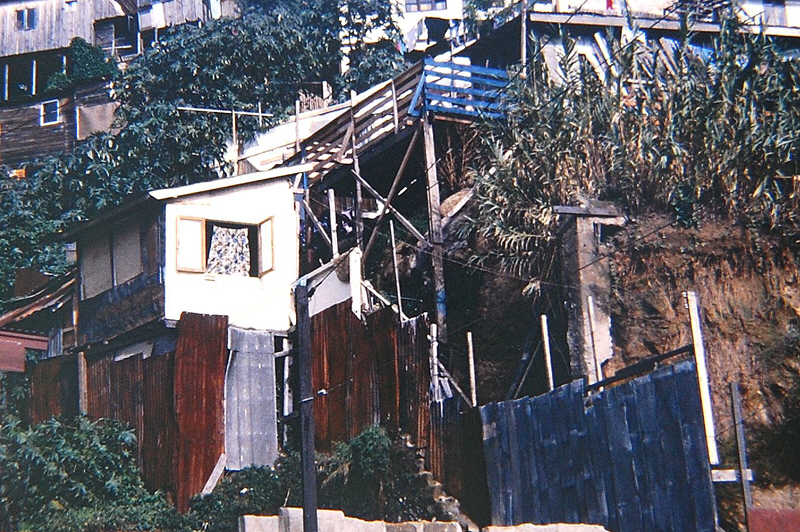
What is interesting is that many of these builders go far beyond what is absolutely necessary for basic shelter, some are clearly experimenting with new ideas, and almost all share an intuitive blend of self-confidence, optimism, instinct, and desperation that leads them to build what often appear to be outrageously dangerous structures.
Surviving @ Net Zero: Building Shelter for an Uncertain World – Insitebuilders
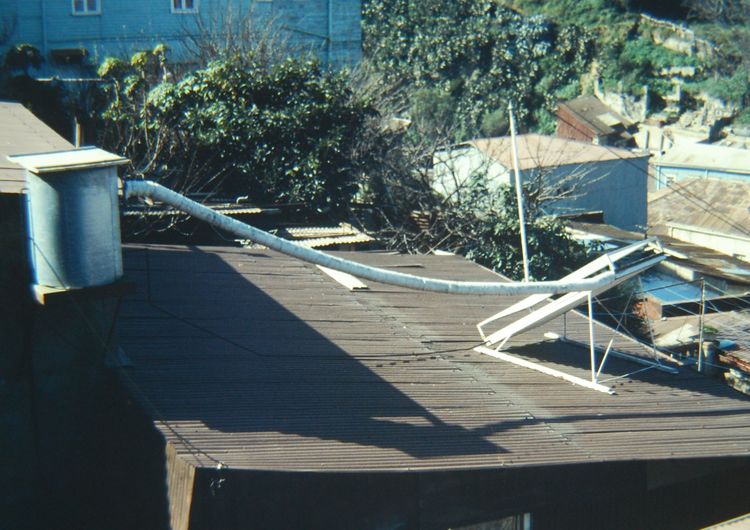
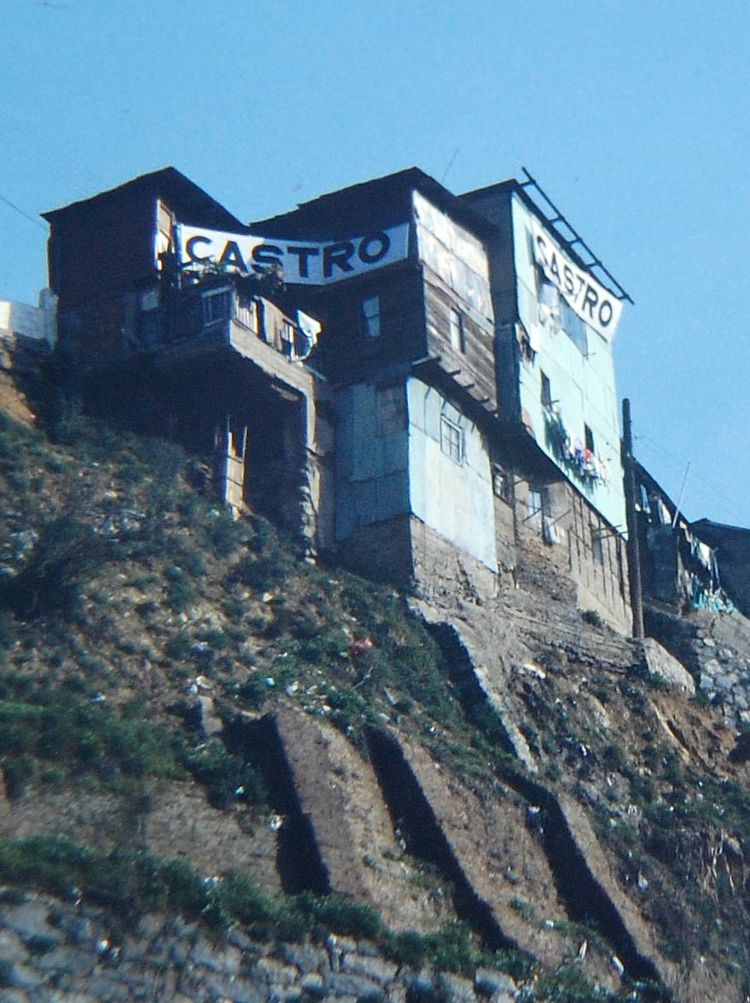
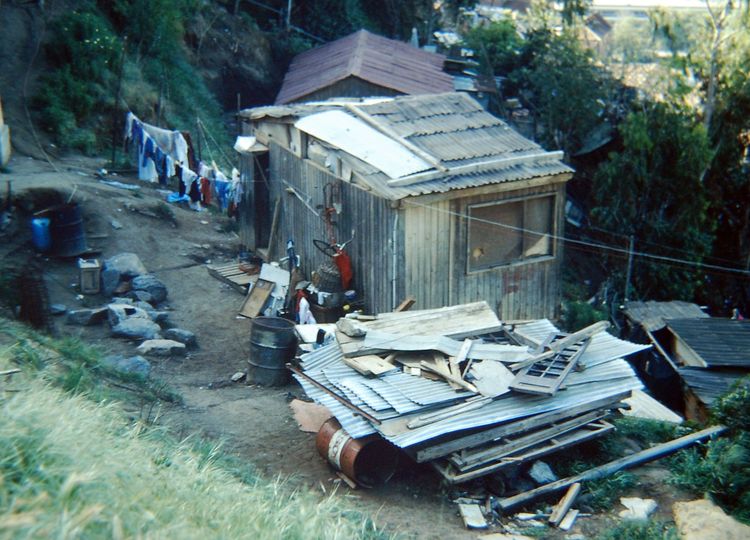
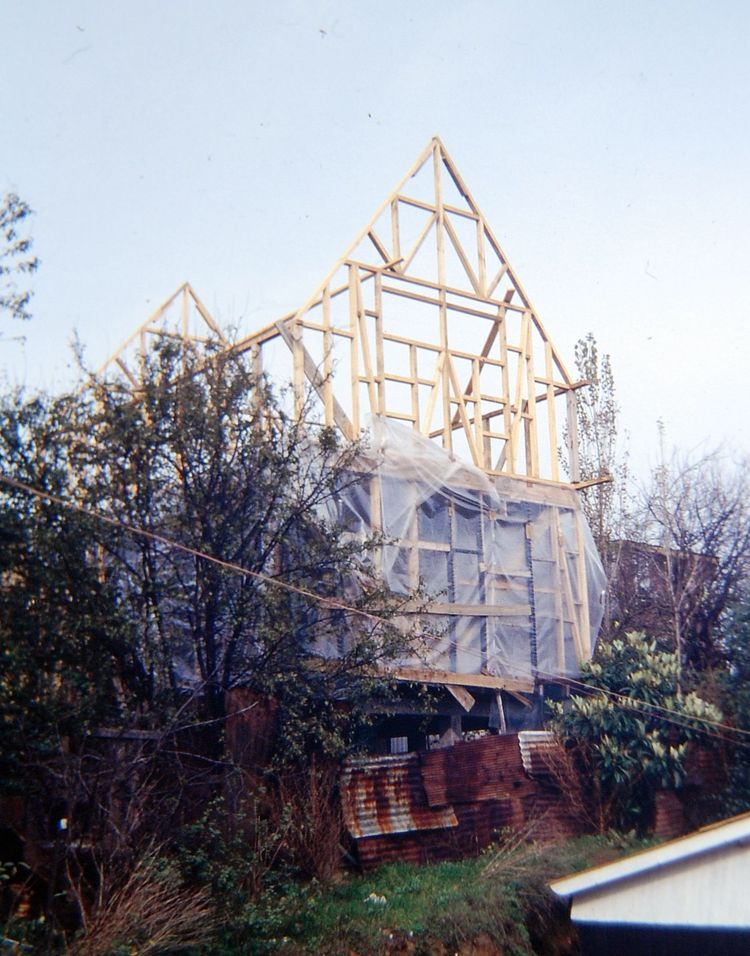
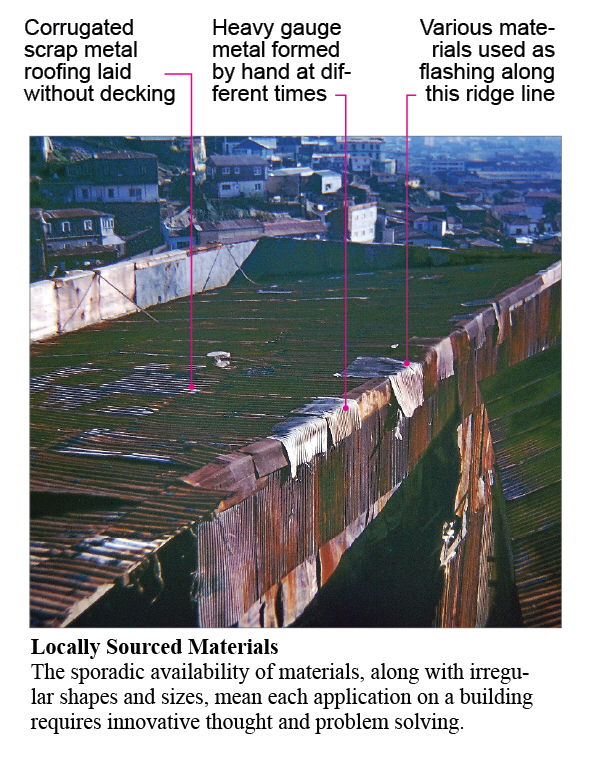
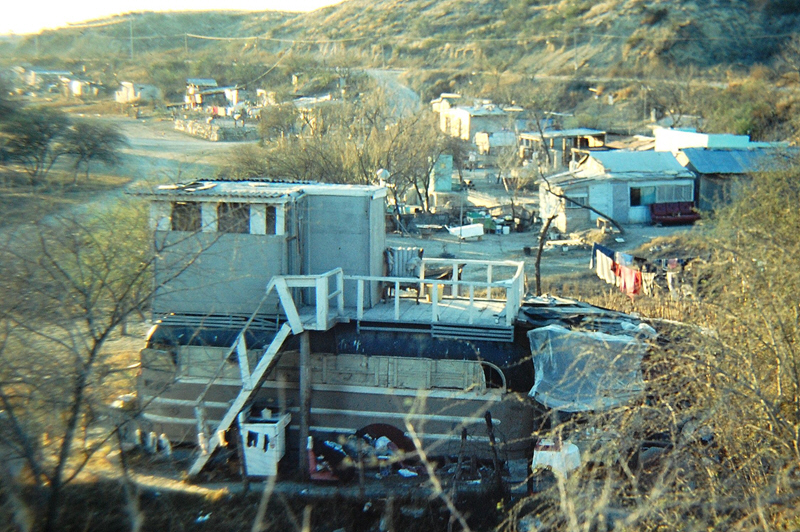
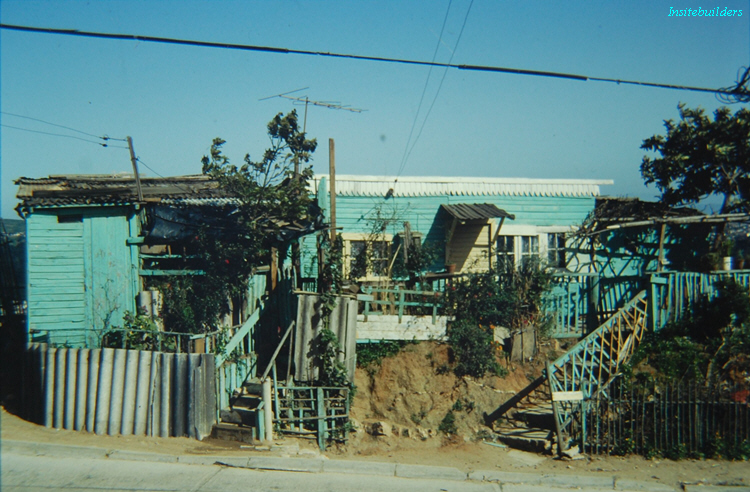
Perched on steep hillsides or abandoned riverbeds, they put together buildings with a few hand tools, very little money, and an odd collection of materials hunted and gathered from whatever resources that surround them. The objects informal builders manage to find are indeterminate, which means they must constantly rethink their application, sorting and storing, waiting for some future inspiration -- perhaps an idea that will be triggered by their next material discovery. All of this, with hunger and insecurity relentlessly at play, ready to discourage their carefully considered inventive strategies.
Surviving @ Net Zero: Building Shelter for an Uncertain World – Insitebuilders
As a result, what we see in the informal sector are buildings shaped by luck, risk, and intuition. These are buildings assembled instinctively in a world where resources are unpredictable, random, and only available when found at little or no costs. Tools and experience influence quality, but constructions begin and end like sculptures. Without the luxury of a plan, design is not an option. Instead, pieces are assembled temporarily as a three-dimensional form of habitable storage, built to be deconstructed and reassembled as new materials are discovered and new configurations are created.  

An instinct for construction
What’s interesting is that these are the same instinctive qualities shared by builders assembling pieces for a virtual construction model. Like informal builders, piece-based modelers share a tactile understanding of the three-dimensional potential of a material. This includes their willingness to visually test ideas by fitting a variety of objects into the details of an evolving physical form -- assembling, deconstructing, and reassembling their buildings according to the self-determined “feel” of a natural builder.
Surviving @ Net Zero: Building Shelter for an Uncertain World – Insitebuilders
This innate passion for construction can be seen in the assemblies of many of the buildings in an informal settlement, clearly reflecting the capacity of their owners to endure the unpredictable circumstances of their lives, the absence of any official support, and the impoverished nature of simply surviving in a net-zero economy. What remains is to wonder at the perceptive genius of their informal constructions, something that has long since been lost to the standards, rules, and regulations of a formal economy.
.

Wednesday, April 18, 2012

Beyond Fashion and Style

Another working except from our new book: Surviving @ Net Zero: Building Shelter for an Uncertain World (Nov 2012)

Most would agree that the cultural context of a building influences the characteristics of its physical form. These are usually seen as decorative features, part of a temporal and evolving style, with no universal truth or purpose other than to entertain the aspirations of their clients. When they work, the resulting buildings fulfill the expectations of their time and place with no lasting influence on society or construction technology.
Insitebuilders: Surviving @ Net Zero: Shelter for an Uncertain World
Even classic building styles are self-defined by the historic, religious, or political discourse that surrounds them, icons of certain cultural values and not the result of some deeper social significance or aesthetic. As a result, we live with buildings that reproduce contemporary ideals only to be oddly antiquated with the passing of time.   

The Vernacular of Net Zero
By contrast, a vernacular architecture describes the physical characteristic of a building that reflects a common method of construction that uses local labor and materials to satisfy the shared needs of a community without adding superfluous stylistic decorations. There is no feature in a vernacular that goes beyond the functional requirements of its existence as a building. As such a vernacular is not influenced by changing trends or fashionable statements that find themselves dated and worn in time.
Insitebuilders: Surviving @ Net Zero: Shelter for an Uncertain World
Vernacular buildings are purposeful, reflecting a human response to their environmental, economic, and social context as a collection of inherent qualities that are often dismissed as crude and unsophisticated by proponents of more self-conscious building styles.
Insitebuilders: Surviving @ Net Zero: Shelter for an Uncertain World
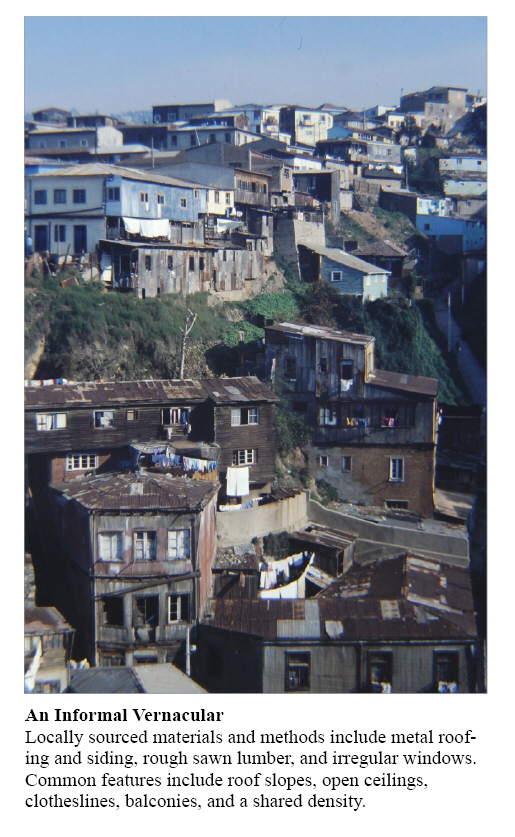
The buildings seen in the informal sector reflect many of the values of a vernacular architecture. While some include personal expressions, they all use the same locally salvaged resources, built with simple hand tools and an intuitive, almost primitive approach to their construction. The result is an immediately recognizable sense of disorder that reflects the essence of their function as pure shelter. Insitebuilders: Surviving @ Net Zero: Shelter for an Uncertain World
This absence of order is of course shaped by impoverished technical limitations, economic exclusion, and a subsequent social marginality that has reduced these buildings to their primal purpose. As such they are a natural response to a basic need for self-preservation as a derivative of a net zero economy with no governing social mandate or regulatory authority to care for them.

Intuitive Construction Methods
What’s interesting is that these informal buildings are slowly reinforced by the security that comes with tenure on land occupied with varying levels of economic success. As such, they are not simply the result of a community of people desperately and haphazardly assembling buildings.

Instead there is a method to their construction that includes a carefully considered assumption of the potential of materials and methods, with clear evidence of varying levels of construction quality. The distinct features of an informal vernacular are driven by the limitations of the materials, tools, and skills available to their builders.
Insitebuilders: Surviving @ Net Zero: Shelter for an Uncertain World
Though it’s easy to discount the resulting structures as completely inadequate, look closer and you see details that require solutions that would be difficult to duplicate with formal construction methods.
Insitebuilders: Surviving @ Net Zero: Shelter for an Uncertain World
 As a result, what we see in these informal buildings is an architecture stripped of the systemic support of an industry of processed materials and practices, leaving the informal builder to invent and implement solutions that are fundamental to their personal needs. Design exists as physical form of three-dimensional problem solving, depending solely on available resources and reduced to the essence of self-determination, imagination, and inventive thought.

The 3D modeling methods of these unique builders follow a survival strategy that holds clear lessons for construction in an uncertain world.
.
Tuesday, March 20, 2012

Beyond Construction Modeling

It doesn’t take more than a few years teaching in a construction school to realize construction students are definitely a breed apart. This fact is particularly interesting when the school is within shouting distance of an architectural school.


For some reason, designers and constructors just don’t mix well. This, of course, is nothing new to anyone working on a jobsite, but it’s particularly interesting that this innate difference in personalities begins well before anyone enters a design or construction program.  

Bimification of Craft
Of course professionals work together effectively no matter what their personalities or motivations, recognizing a mutual interest in coordinating their efforts to get a project built. But the rationalization of the entire construction process tends to diminish both the craft of producing a design and the craft of building a building. In practice, the industrialization of the products created by designers and builders has been going on for a very long time and though both recognize the importance of the others’ work, few practicing today remember the draftsmen or carpenters that were once masters of their craft.

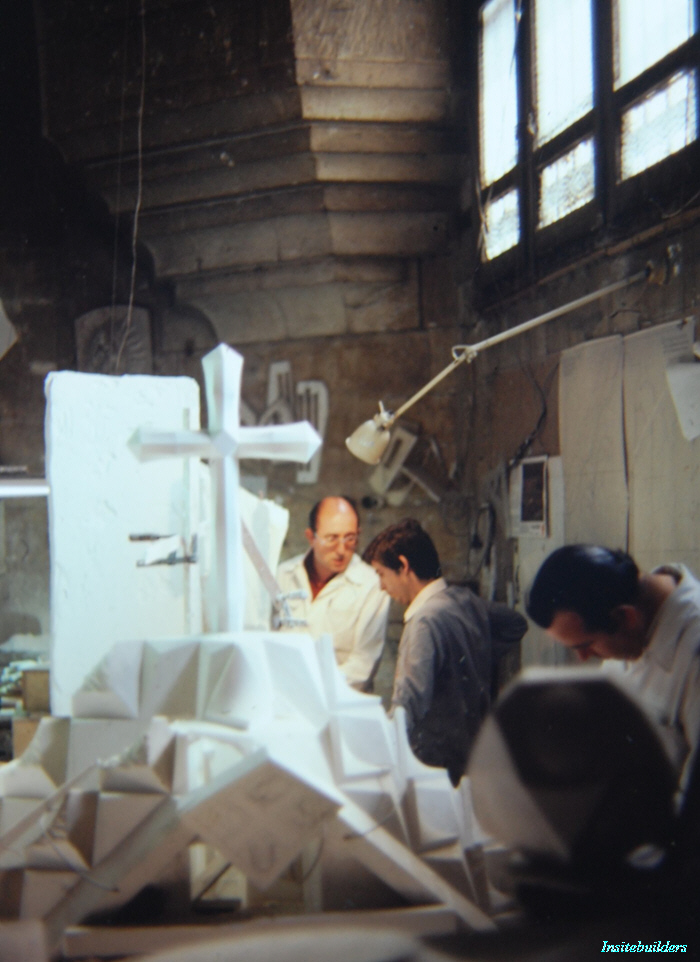
Sagrada MasterBuilders - Insitebuilders
In a fast paced bimified world, it’s very rare to meet either a designer or a builder who has achieved the level of expertise once seen with the legendary masterbuilders. Perhaps things are just too complicated now for individual expression. Where a sheet in a set of construction drawings was once drawn by one person and checked by another, CAD drawings are now a mix of overlays, cross references, imports, and paste-in-place, all following a preprogrammed, almost robotic computerized system.

Like manufacturing a new car, buildings are designed and assembled through repetitive work, maximum efficiency, and carefully managed production. When it works, it gets the job done, but the results are far from a personal expression of any individual’s skill.  

Techne of Craft
Sociologists see this loss of craft as the outcome of specialization, a function of modernity and the reduction of the master craftsmen to wage workers without the time or interest in perfecting their work. Ancient Greeks described the separation of craft from work as a philosophical trait they called “techne.” Techne is the mechanical skill, the living knowledge of a craft, as an understanding of something that brings a sense of satisfaction from a familiar expertise in making or doing.


Techne was once seen in singular objects that were drawn or created with a focus on the physical act of doing, not as an art, but as the result of the actions necessary to proudly put something together with one’s hands to solve a problem or make something that wasn’t there before. The objects that result come from a deep understanding of the tools and materials that are the manifestations of their craft.


The industrialization of craft is of course necessary for human progress. Most would agree there’s no way we could do what we do now in a purely craft-based economy. Considering the systems and specialization, let alone the growing intelligence of both the building and design documentation, we can only dream of those good old days. I’m happy I was a part of them.

Techne @ Net Zero
At the same time, techne exists in design and construction in what appears to be the absence of craft. This is the folk art of pottery and paint, the fantasies of individual expressions.

 
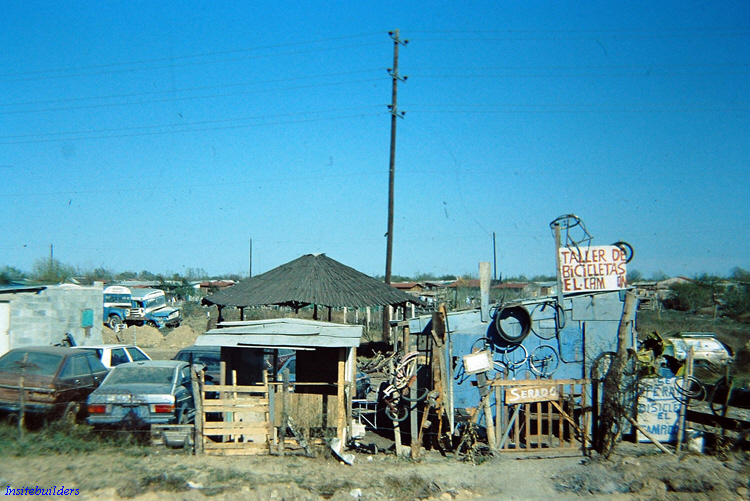
For construction professionals, techne is most apparent when we look at the disordered architecture of the informal sector. These are buildings where craft appears to be excluded from both the details and structure of their form. At the same time, if you look carefully (with the eye of a hands-on do-it-yourselfer) you see the ingenuity and determination embedded in an architecture with no presumptive form, no practiced pretense.

Informal bike shop - Insitebuilders
At first glance, these buildings may seem to be the antithesis of techne. Seen from a developed and disciplined world, they look like unconsciously erratic interpretations of architecture, expression of both untutored self-determination and limited imagination. But look again and you might see a reflection of the personalities we once held before being trained as designers and builders in a post modern world.

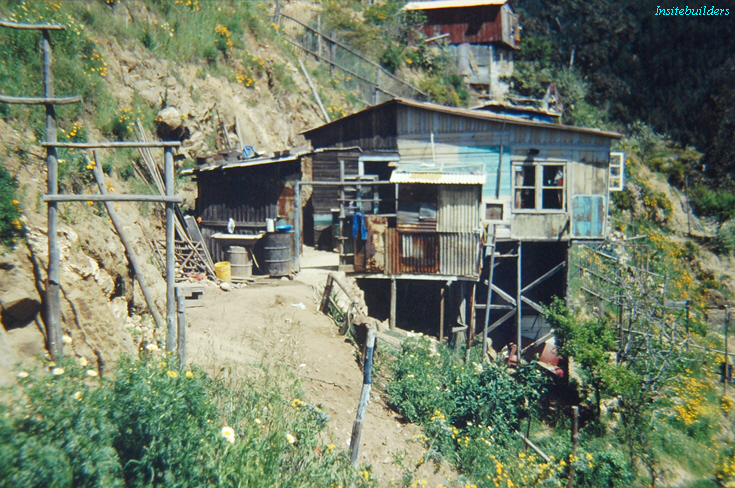
 Informal Builders - Insitebuilders - Casa 8 Elevation
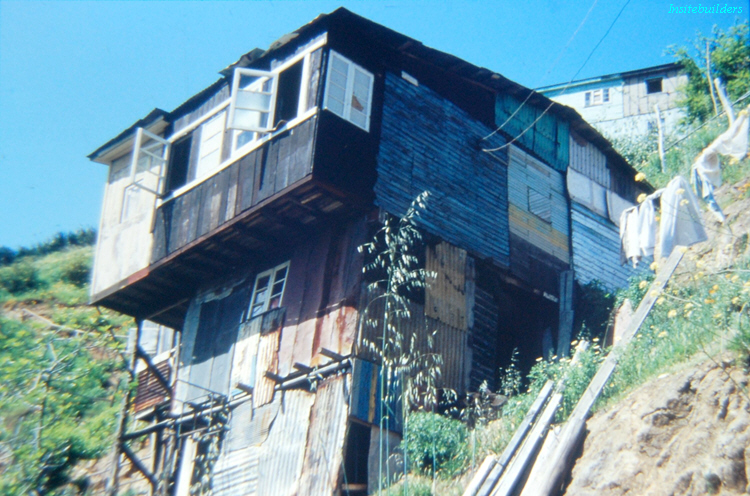
Important is that these buildings stand as the result of impoverished humans responding to the need for shelter with little or no planning, using random and dysfunctional materials, limited tools, and a disordered process that reflects almost none of the formalized systems of an “educated” industrialized society. With no power, scaffolding, or equipment, this is architecture put together by hand with none of the practiced rigor of a preconceived plan or the processed consumables necessary to analytically assemble an orderly product.

Informal builders - Insitebuilders - Casa 8
Standing outside the formal constraints of a rational process, they are a unique human form, distillations of the essence of intuition and invention where shape and substance are created purely out of necessity and an instinct for survival.

Informal roadside sculpture - Insitebuilders
As a purely organic structure, they are built like sculptures with randomly collected materials pieced together to create an object that mixes both doing and design on the margins of rational industrialized thought.  

Beyond Construction Modeling
Study these buildings again as a construction modeler and you see an object that cannot be built as a 3D construction model, first because the pieces and placements don't conform to the simplified geometry of our bimified three-dimensional axes. Second, though the elevations might be photographically textured as a rendered model, the assembled materials cannot be organized in a computer to predict or inform a construction process.

Informal builders - Insitebuilders
Finally, neither the design nor construction can be reduced to an hourly wage. There is no schedule to manage, no deadlines, just an ongoing commitment to self-reliance and determination. Beyond craft or techne, what we see as a result are the purposeful limits of construction modeling.

When the innate personalities of designers and builders are left to wander without the professorial inputs of an institutionalized post industrial world, one is only left to marvel at the techne seen in these informal constructions.
.

Wednesday, February 15, 2012

Simple Process Model

SketchUp models are easily used to animate construction phases. They are quick to set up and can be important in illustrating a schedule or particular sequence of construction that might be critical to a bid or negotiation. Here’s an example (with no sound):


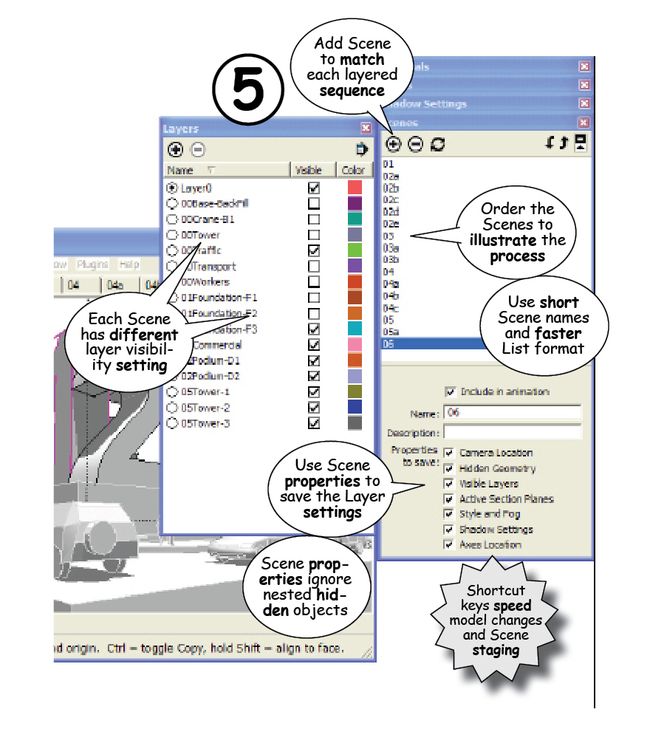
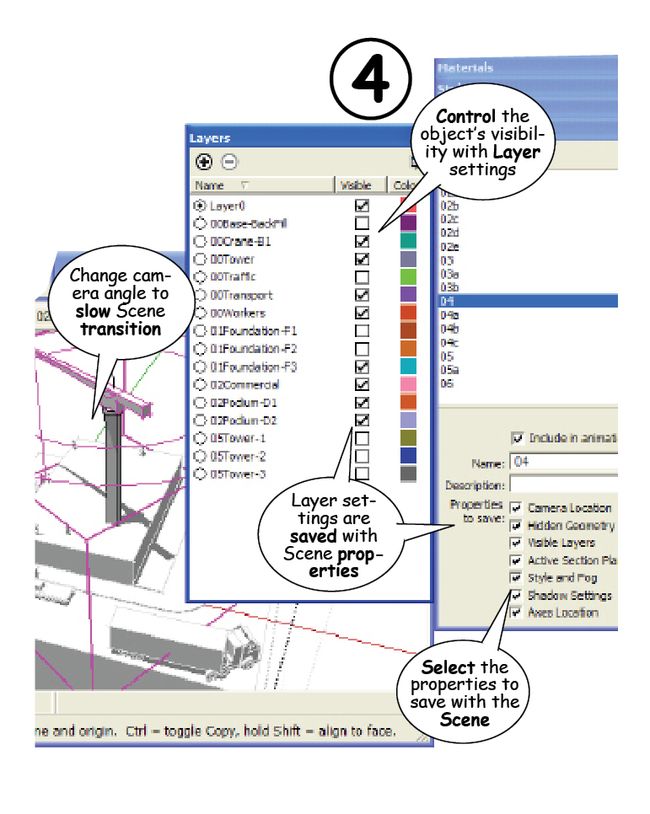
The animation was set up in five steps:

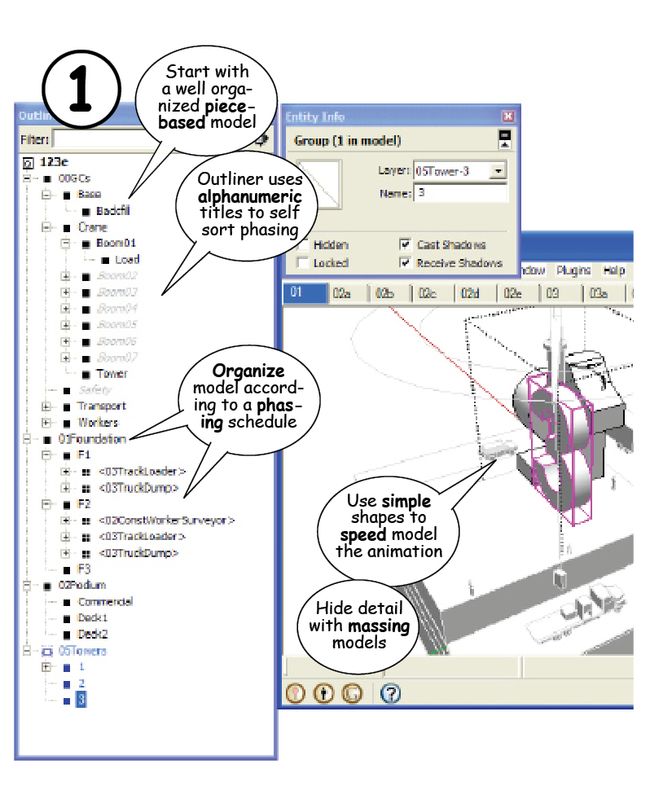
1. Organize the pieces in the Outliner. Start with a well organized construction model (use the 1, 2, and 3 method in the previous articles). Pieces should be grouped and nested according to phase and subcontracts and named alphanumerically so they self-sort in the Outliner. To preserve the original model, use Save As to save a version of the file for the animation.

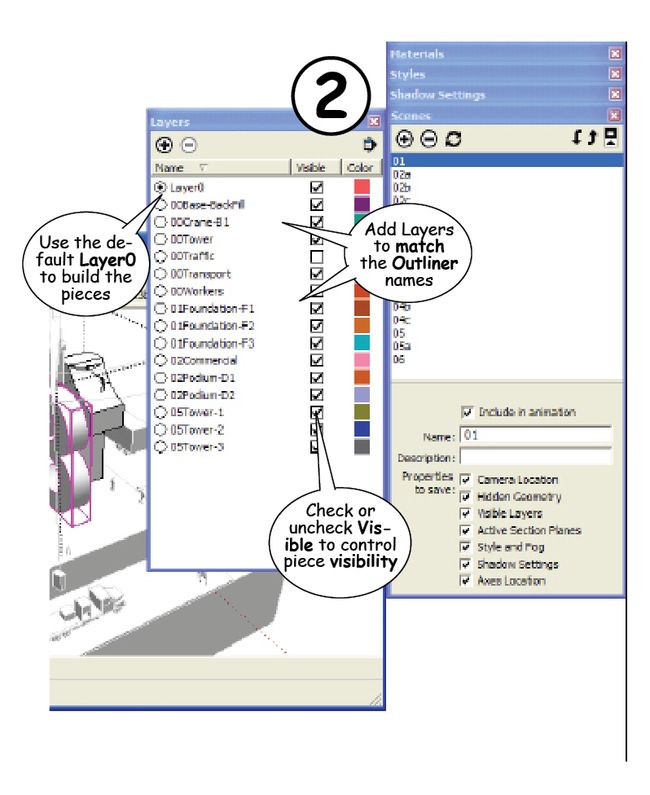
2. Add Layers for control objects. Add Layers to match the alphanumeric names of the pieces, Groups, or Components whose visibility you want to control.
 
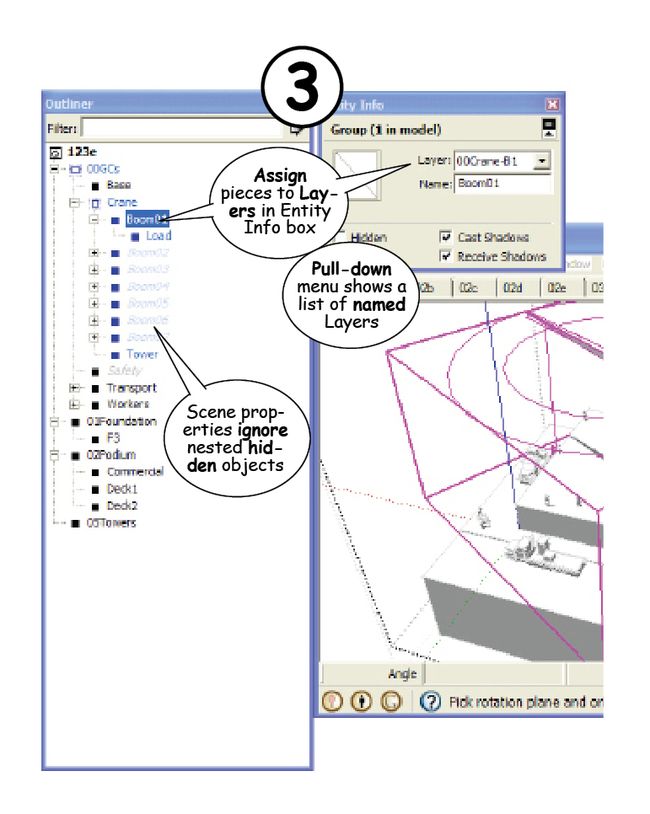
3. Assign pieces to Layers. Select the control object in the Outliner, then use the pull down menu in the Entity Info box to assign it to a corresponding Layer.

4. Set up Layer visibility and Camera. Check or uncheck “Visibility” in the Layers dialog box for each Scene. Change the camera angle, even if only slightly to slow the animation down. Remember you can set the seconds of the transition time between Scenes with the Windows > Model Info > Animation settings -- use at least 5 seconds with no delay time between Scenes.

5. Add the Scene. When the Layers and camera angle are set, click to add the Scene to the sequence. You can add more Scenes and reorder them in the animation with the Up and Down arrows at the top of the Scenes dialog box. Test the animation by clicking through the Scene tabs or the names in the Scenes dialog box before playing the final animation for export or recording. 05: Test SketchUp Scenes  
SOME TIPS:
a. Use simple shapes with minimal detail. Increase detailed Scenes later. 
b. LayerO is the default. Only assign Layers to control visibility. 
c. Shortcut keys are critical to fast and simple model construction. 
d. Hidden pieces within a group are not recognized by the Scene property settings. .

Thursday, January 12, 2012

Simple as 1, 2, 3

SketchUp is not a BIM modeling program. It does not format components or tabulate descriptions, there is no related data assignment, it doesn’t really work well across multi-platforms, it will not generate analytical reports and it will not automatically or even semi-automatically export a 2D drawing. And it is definitely not a drafting program -- though it will produce a great set of construction documents -- if you know what you’re doing.

It’s not about BIM At the same time, anyone can use SketchUp to build a detailed 3D model. Users include high end designers who render buildings in some pretty amazing ways, plus thousands who use SketchUp to visualize space, color, form, and shadow, lay out a stage, storyboard a movie, graphically illustrate a narrative, build a game, or teach almost any subject from K through 12 (and 13-25).

Insitebuilders-Fig1, Blog120112 SketchUp Scenes 

At the same time, no real constructor needs a model to visualize a set of 2D construction drawings -- it’s not that hard. Students even learn to imagine space and draft 2D floor plans, elevations, and sections in junior high school – though they prefer building 3D models.

Construction modeling is process modeling Important is that the real potential of construction modeling is in simulating a process. A construction model animates time. Here are some recent examples:
  • Site utilization planning (SUP), mobilization, and startup
  • Tricky lifts or placement of concrete, steel, and air handlers
  • Sequence safety lines while decking a high rise steel frame
  • Coordinate labor & material as floor phases, 36 story build
  • Simulate safety changeovers in placing fall protection
  • Designate safety zones and restricted areas changeovers
  • Simulate stair & deck installs on fast track steel frame
  • Determine distances, timing, staging, & material movement
  • Phase and process demonstrations and method sequencing
  • Scale safety zone markers for overhead material movement
  • Coordinate move-on, staging, & subcontract start-up
  • Scale a lay-down to maximize temporary dry storage
  • Crane arcs into storage areas and placement to grid lines
  • Most of you get it….it is not about BIM, drawings, or design
Insitebuilders.com-Fig3, Blog120113 - Process simulation
 
Simulate process as easy as 1, 2, 3
  • Step 1: Think out of the box, everything comes from a box.
  • Step 2: Inferences & guides to assemble a piece based model
  • Step 3: The Outliner and components control time captures
Once built, a static piece-based model can then be deconstructed to illustrate a process as a clickable series of steps or phases, a video that moves from place to place to record different views of an assembly process, or an animation that both anticipates and simulates movement on the jobsite.

Here are three simple examples to try:  

Clickable Scenes


Scene Properties used to set camera location, field of view, time/shadows, hidden objects, layers, and annotations. Click here to download the model.  

Video Capture


Animation settings used to set delay and transition between Scenes. Video then exported as a movie or captured with one of several free video capture programs. Click here to download the model.  

Motion Capture


Use the same scene by scene animation technique film makers use to capture CGI motion. Click here to download the model.
.

Tuesday, December 13, 2011

#3 The Outliner Organizes the Process

The real advantage of SketchUp as a construction modeler is that it can quickly illustrate or animate any sequence of events from a piece-based assembly.  Notes and dimensions are easily added to exports and the results inserted into working documents, presentations, and email during an ongoing construction process. 


Review Steps #1 and #2
#1.  Each piece begins as a box. Start with a rectangle, extrude it, then shape and modify the box to match the specifications for that piece.  When ready, group and name the results.  Make them SketchUp Components when you know there are going to be several identically scaled clones of the same piece. 

#2Assemble the grouped objects using one of the many Inferences and Guidelines built into SketchUp.  Use the Move and Rotate tools to snap the pieces into position and the Control key to make copies as you build the model.  

Once the construction model is assembled, it can be quickly staged for Export as a 2D Graphic or Animation using SketchUp’s File Menu.  Deconstruction for illustrations and animations are controlled by the SketchUp Outliner and Scenes. 

The Outliner
Use the Outliner to nest the named groups into subassemblies that represent subcontracts or sequences that will be important to the processes you may want to illustrate.  


Group the pieces by selecting them in the Outliner with the Shift or Control key.  The Shift key lets you select a series of pieces and the Control key allows you to pick and choose the pieces you want to be in the nested group.  Once selected, use the Make Group command in the Edit Menu and immediately name the new group.  A Shortcut key makes it possible to group objects by pressing a single key.

Once a group is formed in the Outliner, you can drag pieces in and out of that group, double click a name in the Outliner to edit that piece in the 3D model, or combine and reorganize several groups into more complex subassemblies. 

Setting up the Scenes
Use the Orbit and Pan tools to position the camera angle.  Then select any piece or group in the Outliner to Hide or Unhide it and change its visibility for each Scene.  


When ready, use the “ + “ symbol at the top of the Scenes Dialog Box to add a Scene along with the “Properties to save” with that Scene.  Scene names and descriptions help identify content in the Scene, and the “Include in animation” check box will schedule the Scene for export to an animation.  Transition and delay settings are found in SketchUp’s Model Info Dialog Box in the Window Menu.


Annotations and dimensions can be added to each Scene.  You can also capture or Export the Scenes as a 2D Graphic or Animation for further editing in a draw or image editing program, or insert them directly into a working document.

Controlling the visibility or motion of individual pieces in the subassembly is a little trickier, I’ll cover that next time.

Tips
Use a library.  Every piece only needs to be made once when it’s saved to a library.  This means after a couple of models, rapid assembly is possible because you simply drag and drop the pieces into the model from your own collection of construction materials.

Annotate the images.  Use a Draw program to edit and annotate exported graphics.  A free version is included in OpenOffice, or use any of the many free screen capture and image editors found at Only Freewares.  Faststone and PicPick are probably the easiest to use free programs for image captures and quick annotations.

Export animations.  You’ll find the Export Animation feature in the free version of Google SketchUp produces a pretty basic low-resolution animation.  Check out one of the many video capture programs found at Freeware Home when better results are important.  I use the free version of CamStudio for AVI movies and Wink for Flash animations.